

Overview
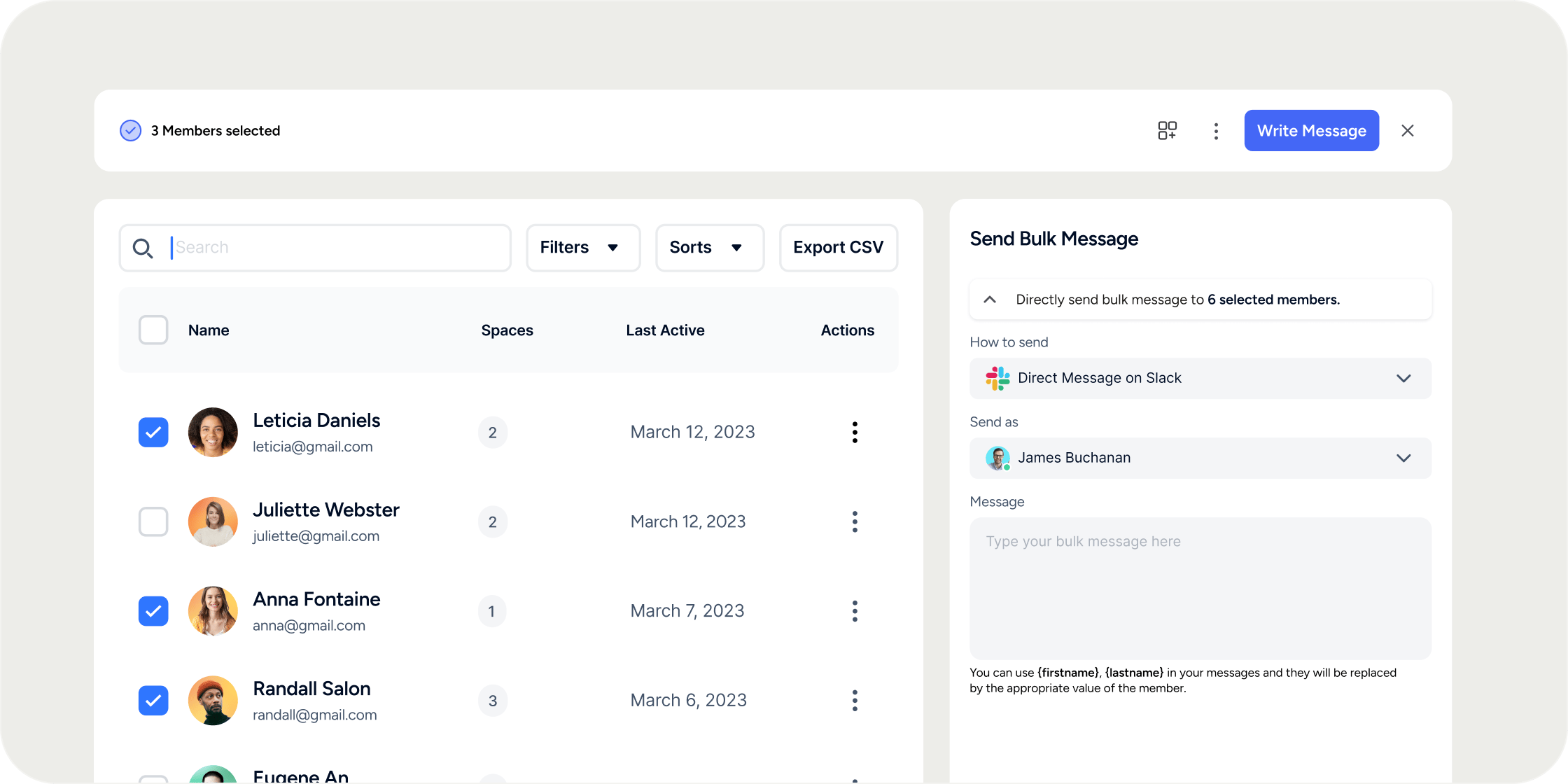
Bulk Messaging allows you to reach multiple members simultaneously without creating a group conversation. Each recipient receives an individual message, keeping communication one-to-one. You can deliver messages by email or, if Slack is connected to your Academy, by Slack direct message. Messages support personalization variables so you can address each member by name at scale. Bulk Messaging is available to community admins, program managers, program instructors, and group leads.Send a Bulk Message
- Navigate to Admin → Members.
- Check the boxes next to the members you want to contact.
- In the action bar that appears, click Send Message.
- A drawer opens. Select your delivery method: Email or Slack Direct Message.
- The Slack Direct Message option only appears if your Academy has Slack connected.
- Write your message. Use personalization variables to address each member by name (see Personalize Your Message below).
- Click Send.
Send a Bulk Message from a Program
You can also send a bulk message directly from within a Program. This is the fastest way to reach all members enrolled in a specific Program without filtering from the main Members table.- Navigate to the Program and open the Members tab.
- Use the Select All toggle to select every enrolled member, or check individual boxes to select specific members.
- Click Compose Email.
- Write your message and click Send.
Personalize Your Message
Two variables are available to personalize bulk messages:
For example, starting your message with
Hi {{ user.firstName }}, will greet each recipient by their first name when the message is delivered.
FAQ
Who can send bulk messages?
Who can send bulk messages?
Community admins, program managers, program instructors, and group leads can all send bulk messages to members.
Can I send a Slack direct message without Slack connected?
Can I send a Slack direct message without Slack connected?
No. The Slack Direct Message option only appears if your Academy has an active Slack integration. If Slack is not connected, Email is the only available delivery method.
Can I message all members of a Program at once without selecting them individually?
Can I message all members of a Program at once without selecting them individually?
Yes. Navigate to the Program, open the Members tab, and use the Select All toggle to select all enrolled members at once, then click Compose Email.
Can I email attendees of an event using bulk messaging?
Can I email attendees of an event using bulk messaging?
Yes. Navigate to the event, open the Attendees tab, use the Select All toggle, and click Send Email. This follows the same flow as bulk messaging from the Members table.
Can members reply to a bulk message?
Can members reply to a bulk message?
Members can reply to bulk emails and their reply will arrive as an individual email to the sender. For Slack direct messages, the member can reply within the direct message thread.
Can I view a history of bulk messages I have sent?
Can I view a history of bulk messages I have sent?
Not currently. There is no sent-messages log in Disco for bulk messages. As a workaround, include yourself as a recipient when you send so a copy lands in your own inbox.
Are analytics available for bulk messages, such as open rates or click rates?
Are analytics available for bulk messages, such as open rates or click rates?
No. Bulk message analytics are not currently available in Disco.
Is there a draft feature for bulk messages?
Is there a draft feature for bulk messages?
No. Bulk messages do not support draft saving. Review your message carefully before clicking Send, as there is no way to save and return to a draft later.
What should I do if I see an "Unexpected error, please try again" message?
What should I do if I see an "Unexpected error, please try again" message?
Try opening Disco in an Incognito or private browsing window and attempt to send the message again. Browser extensions or cached sessions can sometimes interfere. If the error persists across browsers, contact Disco support.