

Overview
Disco is a subscription-based platform. Every new Academy starts with a free 7-day trial so you can explore the product before committing to a paid plan. After your trial, you choose a plan that fits your scale and requirements. Plans are billed annually, with monthly billing also available. You manage your plan and payment details from the Billing page in your Admin Area.Compare Plans
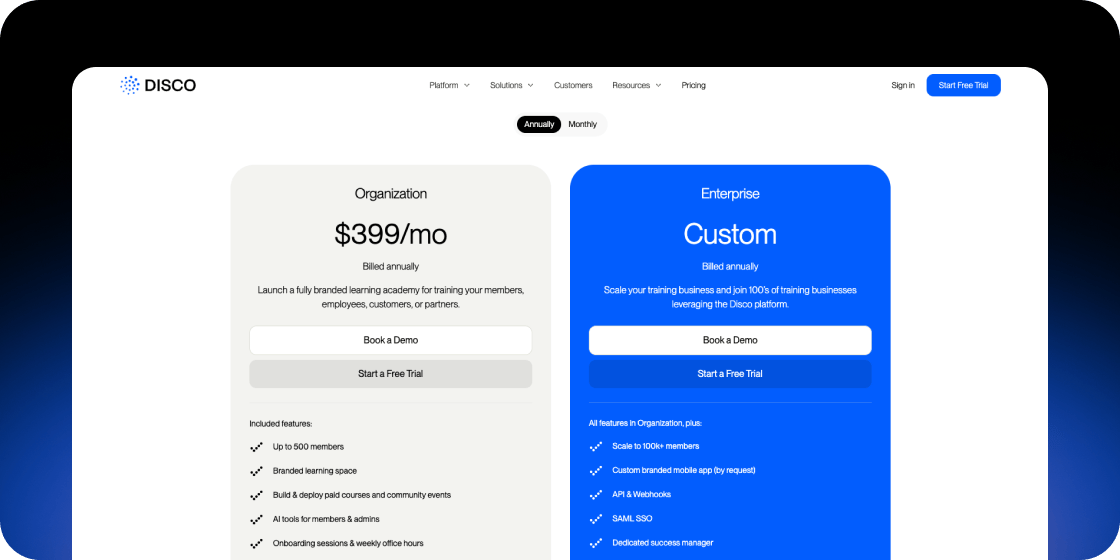
Disco offers two paid plans: Organization and Enterprise. Both are billed annually or monthly. Organization is priced at $399/month (billed annually) and includes:- Up to 500 members
- Branded learning space
- Build and deploy paid courses and community events
- AI tools for members and admins
- Onboarding sessions and weekly office hours
- Discount for nonprofits
- Scale to 100k+ members
- Custom branded mobile app (by request)
- API and Webhooks
- SAML SSO
- Dedicated success manager
- Personalized migration and onboarding
Free Trial
Every new Disco Academy starts with a free 7-day trial. No commitment is required to start your trial. At the end of the trial period, you will need to select a paid plan and add a payment method to continue using your Academy.View Your Current Plan
- In your Admin Area, navigate to Settings in the left sidebar.
- Select Billing.
- Your current plan appears under Plan Details.
Update Your Plan
- Go to Admin Area > Settings > Billing.
- Under Plan Details, click Update Plan.
- Follow the prompts to select your new plan and confirm the change.
If you are approaching your member limit or need features like API access or SAML SSO, upgrading to Enterprise is the right move. Contact the Disco team to get a custom quote and migration support.
Add a Payment Method
- Go to Admin Area > Settings > Billing.
- Under Billing, click Add a payment method.
- Enter your card details and save.
Cancel Your Plan
- Go to Admin Area > Settings > Billing.
- Under Plan Details, click Cancel Plan.
- Follow the prompts to confirm cancellation.
FAQ
Do I need a credit card to start my free trial?
Do I need a credit card to start my free trial?
No, a credit card is not required to start the 7-day free trial. You only need to add a payment method when you are ready to subscribe to a paid plan.
What happens when my free trial ends?
What happens when my free trial ends?
Your trial expires after 7 days. To continue using your Academy, select a paid plan and add a payment method in Admin Area > Settings > Billing.
Can I switch between monthly and annual billing?
Can I switch between monthly and annual billing?
Yes. Disco supports both monthly and annual billing. Annual billing offers a lower effective monthly rate. You can review billing frequency options when you update your plan.
How does prorated billing work if I upgrade mid-cycle?
How does prorated billing work if I upgrade mid-cycle?
If you upgrade your plan before your current billing period ends, you will be charged a prorated amount for the remainder of the current period, plus the full subscription price starting from your next billing date.
Is there a nonprofit discount?
Is there a nonprofit discount?
Yes. The Organization plan includes a discount for nonprofits. Contact support@disco.co to apply.
Where can I find my invoices and billing receipts?
Where can I find my invoices and billing receipts?
Contact support@disco.co and the team will send your invoices directly. Receipts are sent to the billing email address on your account.
Can I get a refund?
Can I get a refund?
Disco handles refund requests on a case-by-case basis. Contact support@disco.co as soon as possible after an unexpected charge and the team will review your request.
I can't find the option to upgrade my plan. What should I do?
I can't find the option to upgrade my plan. What should I do?
If Update Plan is not visible, your Academy may be on an annual plan that is not yet due for renewal. Plan changes on annual subscriptions are processed at renewal. Contact support@disco.co to discuss your options.