> ## Documentation Index
> Fetch the complete documentation index at: https://docs.disco.co/llms.txt
> Use this file to discover all available pages before exploring further.
# Webhooks
Webhooks push real-time event data from Disco to a configured endpoint as events happen in your Academy, so external systems can react without polling the API.
 ## **Overview**
Webhooks are the push-based half of Disco's developer toolkit. When a Member completes a lesson, joins a Program, or submits an assignment, Disco sends the event payload to every endpoint subscribed to that event. Use this for live dashboards, CRM syncs, Member notifications, and downstream automations. Webhooks are available on the Enterprise plan only, and only Academy Owners and Admins can configure them. Every request is signed, and Disco retains delivery logs for 30 days.
The Disco API and Webhooks use older terminology. In API requests and responses, `Community` refers to what Disco now calls an **Academy**, and `Product` refers to what Disco now calls a **Program**. Keep this in mind when mapping API fields to what you see in the product.
## **Create a Webhook Endpoint**
Endpoints are configured in the Admin Area.
1. Go to **Admin Area** → **Settings** → **Webhooks**.
2. Click **+ Endpoint**.
3. Enter an Endpoint URL. HTTPS is required. HTTP URLs are rejected.
4. Optionally configure **Custom Headers** as key and value pairs. Keys that start with X-Disco- are reserved and cannot be used.
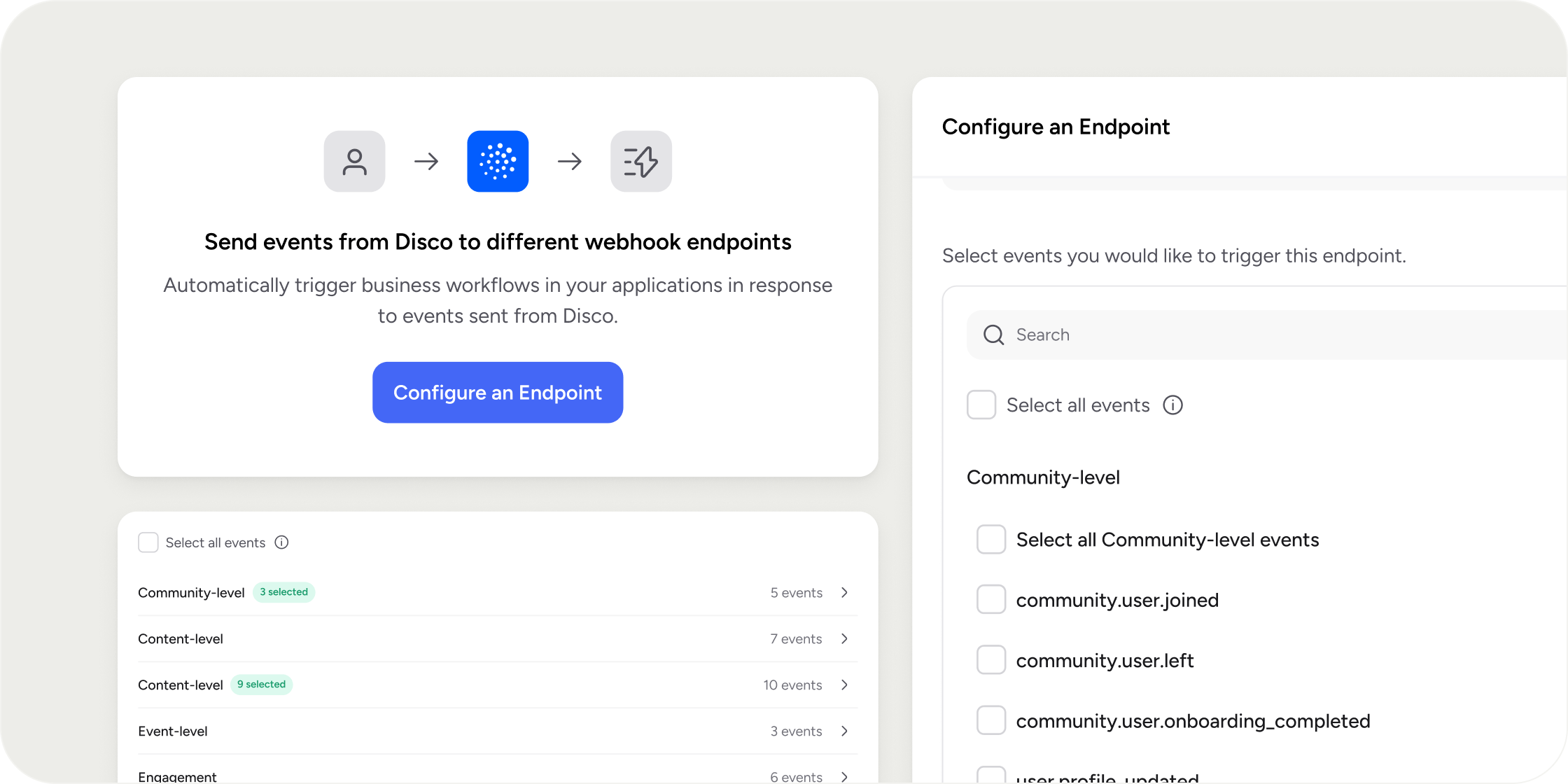
5. Select the events this endpoint should receive. Events are grouped by category: Community, Product, Pathway, Content, Engagement, Event, and Group. The same event can be sent to multiple endpoints, and one endpoint can receive multiple events.
6. Click **Save**.
The endpoint is created in an enabled state and begins receiving events right away. Re-open the endpoint to view its Signing Secret, which is generated at creation and used to sign every outgoing request. Use the Show/Hide toggle to reveal it and the Copy button to copy it. Store the secret in the receiving system so you can verify signatures.
## **Disable or Re-enable an Endpoint**
Disabling an endpoint stops new events without deleting the configuration or losing logs.
1. Go to **Admin Area** → **Settings** → **Webhooks**.
2. Locate the endpoint in the **Webhook Endpoints** table.
3. Open the **Action** menu and select **Disable Endpoint**.
A banner on the endpoint shows who disabled it and when. No new events send while disabled. To restart delivery, open the **Action** menu and select **Enable Endpoint**.
## **Delete an Endpoint**
Deletion removes the endpoint and all its logs permanently.
1. Go to **Admin Area** → **Settings** → **Webhooks**.
2. Locate the endpoint in the **Webhook Endpoints** table.
3. Open the **Action** menu and select **Delete Endpoint**.
This cannot be undone. If you only want to pause delivery, disable the endpoint instead.
## **View Event History and Retry Failed Events**
Each endpoint keeps a full log of every event it has attempted to send.
1. Open the endpoint and switch to the **Send Logs** tab.
2. Use filters or search to locate specific events.
3. Select an event to view its full request, response, headers, and payload.
4. To retry a failed event, open its **Action** menu and select **Resend**.
A resent event creates a new log entry with the same event ID, tagged Resent and linked to the original. Retries are blocked for events on disabled endpoints and for events still in progress.
## **Validate Signed Webhook Requests**
Every webhook request is signed using the RFC-9421 standard ([https://www.rfc-editor.org/rfc/rfc9421.html](https://www.rfc-editor.org/rfc/rfc9421.html)). Disco uses the endpoint's Signing Secret to create the Signature, built from the components specified in the Signature-Input header. Use the Content-Digest header to verify the integrity of the message body.
We recommend the http-message-signatures package ([https://www.npmjs.com/package/http-message-signatures](https://www.npmjs.com/package/http-message-signatures)). A minimal TypeScript example:
```typescript theme={null}
async function validateSignedRequest(
request: {
method: string
url: string
headers: Record
body: any
},
// Signing Secret from the endpoint config in platform
signingSecret: string
): Promise {
// Verify the message signature
const verified = Boolean(
await httpbis.verifyMessage(
{
keyLookup: async () => {
return {
id: "shared-secret",
alg: ["hmac-sha256"],
verify: createVerifier(signingSecret, "hmac-sha256"),
}
},
},
request
)
)
// Verify the content digest matches the body
const contentDigest = request.headers["Content-Digest"] as string
const data = JSON.stringify(request.body)
const expectedDigest = `sha-512=:${crypto
.createHash("sha512")
.update(data)
.digest("base64")}:`
const digestMatches = contentDigest === expectedDigest
return verified && digestMatches
}
```
## **Important Considerations**
* Disco does not automatically retry failed deliveries. Any non-2xx response or a timeout is logged as a failed delivery, and you must trigger a retry manually from **Send Logs**.
* Bulk retry is not available. If many events fail during a receiver outage, each one must be resent individually.
* Event delivery order is not guaranteed. Do not assume, for example, that a user\_joined event always arrives before a related user\_completed event.
* Logs are retained for 30 days. Older events are deleted and cannot be recovered, even if the endpoint is re-enabled.
* Signing Secrets cannot be rotated. If a secret is exposed, create a new endpoint with a new secret and point the receiver at it.
Start with one endpoint per downstream system, not one per event. Subscribe that endpoint to every event the downstream system cares about, let your receiver branch on the event name, and use Custom Headers for receiver-side authentication. This keeps the number of Signing Secrets you have to manage small, makes retries easier to reason about, and keeps the Send Logs easier to scan when something goes wrong.
## **Examples**
A cohort course syncs progress to a CRM. An endpoint subscribed to content.user\_completed and product.user\_completed updates each Member's contact record so the CS team can spot disengagement early.
A professional community sends celebration messages on lesson completion. An endpoint subscribed to content.user\_completed posts to a Slack workspace every time a Member finishes a lesson.
A bootcamp powers an external leaderboard. A single endpoint subscribes to Content, Product, and Pathway completion events, and the internal dashboard updates in real time.
## **FAQ**
Delivery fails and Disco records it in the Send Logs. There are no automatic retries. Once the endpoint is back up, retry the failed events manually from Send Logs.
Yes. Subscribe any number of endpoints to the same event. Each endpoint receives an independent delivery with its own log.
Disco stops sending new events to the endpoint. The configuration and existing logs are preserved, and you can edit the endpoint while disabled. Re-enable it at any time to resume delivery.
Yes. All requests are sent over HTTPS and signed with the endpoint's Signing Secret using the RFC-9421 standard. You can also configure Custom Headers for additional receiver-side authentication.
Disco resends the original payload using the endpoint's current URL and Custom Headers. A new log entry is created with the same event ID, tagged Resent and linked to the original.
30 days. Older logs are deleted automatically and cannot be recovered, even if the endpoint is re-enabled.
No. The secret is generated once at endpoint creation and cannot be changed. If a secret is exposed, create a new endpoint, point the receiver at the new Signing Secret, and delete the old endpoint.
The timeout is fixed. Any request that runs longer is logged as a failed delivery. The exact value is documented in the OpenAPI spec at[ https://api.production.services.disco.co/v1/docs](https://api.production.services.disco.co/v1/docs).
Delivery order is not guaranteed. Build receivers that can handle events in any order, especially when two related events fire close together.
No. HTTPS is required. HTTP URLs are rejected at creation.
No. Keys that start with X-Disco- are reserved for Disco-managed headers like signing metadata.
No. content.user\_submitted\_assignment fires on submission and includes submission details like text, link, attachment IDs, due date, and visibility, but it does not include graded scores. For scored completions, content.user\_completed\_quiz includes score, did\_pass, and pass\_percentage. Export assignment grading data from Admin Insights in the meantime.
Yes. Examples include content.user\_completed, content.user\_completed\_quiz, product.user\_completed\_curriculum\_module, product.user\_completed, pathway.user\_completed, and pathway.user\_completed\_pathway\_group. See the full list in the OpenAPI docs at[ https://api.production.services.disco.co/v1/docs](https://api.production.services.disco.co/v1/docs).
No. Webhooks are an Enterprise-only feature. The **Webhooks** settings page is hidden on other plans.
Only Academy Owners and Admins. Program Managers and Instructors do not have access to the Webhooks settings page.
## **Overview**
Webhooks are the push-based half of Disco's developer toolkit. When a Member completes a lesson, joins a Program, or submits an assignment, Disco sends the event payload to every endpoint subscribed to that event. Use this for live dashboards, CRM syncs, Member notifications, and downstream automations. Webhooks are available on the Enterprise plan only, and only Academy Owners and Admins can configure them. Every request is signed, and Disco retains delivery logs for 30 days.
The Disco API and Webhooks use older terminology. In API requests and responses, `Community` refers to what Disco now calls an **Academy**, and `Product` refers to what Disco now calls a **Program**. Keep this in mind when mapping API fields to what you see in the product.
## **Create a Webhook Endpoint**
Endpoints are configured in the Admin Area.
1. Go to **Admin Area** → **Settings** → **Webhooks**.
2. Click **+ Endpoint**.
3. Enter an Endpoint URL. HTTPS is required. HTTP URLs are rejected.
4. Optionally configure **Custom Headers** as key and value pairs. Keys that start with X-Disco- are reserved and cannot be used.
5. Select the events this endpoint should receive. Events are grouped by category: Community, Product, Pathway, Content, Engagement, Event, and Group. The same event can be sent to multiple endpoints, and one endpoint can receive multiple events.
6. Click **Save**.
The endpoint is created in an enabled state and begins receiving events right away. Re-open the endpoint to view its Signing Secret, which is generated at creation and used to sign every outgoing request. Use the Show/Hide toggle to reveal it and the Copy button to copy it. Store the secret in the receiving system so you can verify signatures.
## **Disable or Re-enable an Endpoint**
Disabling an endpoint stops new events without deleting the configuration or losing logs.
1. Go to **Admin Area** → **Settings** → **Webhooks**.
2. Locate the endpoint in the **Webhook Endpoints** table.
3. Open the **Action** menu and select **Disable Endpoint**.
A banner on the endpoint shows who disabled it and when. No new events send while disabled. To restart delivery, open the **Action** menu and select **Enable Endpoint**.
## **Delete an Endpoint**
Deletion removes the endpoint and all its logs permanently.
1. Go to **Admin Area** → **Settings** → **Webhooks**.
2. Locate the endpoint in the **Webhook Endpoints** table.
3. Open the **Action** menu and select **Delete Endpoint**.
This cannot be undone. If you only want to pause delivery, disable the endpoint instead.
## **View Event History and Retry Failed Events**
Each endpoint keeps a full log of every event it has attempted to send.
1. Open the endpoint and switch to the **Send Logs** tab.
2. Use filters or search to locate specific events.
3. Select an event to view its full request, response, headers, and payload.
4. To retry a failed event, open its **Action** menu and select **Resend**.
A resent event creates a new log entry with the same event ID, tagged Resent and linked to the original. Retries are blocked for events on disabled endpoints and for events still in progress.
## **Validate Signed Webhook Requests**
Every webhook request is signed using the RFC-9421 standard ([https://www.rfc-editor.org/rfc/rfc9421.html](https://www.rfc-editor.org/rfc/rfc9421.html)). Disco uses the endpoint's Signing Secret to create the Signature, built from the components specified in the Signature-Input header. Use the Content-Digest header to verify the integrity of the message body.
We recommend the http-message-signatures package ([https://www.npmjs.com/package/http-message-signatures](https://www.npmjs.com/package/http-message-signatures)). A minimal TypeScript example:
```typescript theme={null}
async function validateSignedRequest(
request: {
method: string
url: string
headers: Record
body: any
},
// Signing Secret from the endpoint config in platform
signingSecret: string
): Promise {
// Verify the message signature
const verified = Boolean(
await httpbis.verifyMessage(
{
keyLookup: async () => {
return {
id: "shared-secret",
alg: ["hmac-sha256"],
verify: createVerifier(signingSecret, "hmac-sha256"),
}
},
},
request
)
)
// Verify the content digest matches the body
const contentDigest = request.headers["Content-Digest"] as string
const data = JSON.stringify(request.body)
const expectedDigest = `sha-512=:${crypto
.createHash("sha512")
.update(data)
.digest("base64")}:`
const digestMatches = contentDigest === expectedDigest
return verified && digestMatches
}
```
## **Important Considerations**
* Disco does not automatically retry failed deliveries. Any non-2xx response or a timeout is logged as a failed delivery, and you must trigger a retry manually from **Send Logs**.
* Bulk retry is not available. If many events fail during a receiver outage, each one must be resent individually.
* Event delivery order is not guaranteed. Do not assume, for example, that a user\_joined event always arrives before a related user\_completed event.
* Logs are retained for 30 days. Older events are deleted and cannot be recovered, even if the endpoint is re-enabled.
* Signing Secrets cannot be rotated. If a secret is exposed, create a new endpoint with a new secret and point the receiver at it.
Start with one endpoint per downstream system, not one per event. Subscribe that endpoint to every event the downstream system cares about, let your receiver branch on the event name, and use Custom Headers for receiver-side authentication. This keeps the number of Signing Secrets you have to manage small, makes retries easier to reason about, and keeps the Send Logs easier to scan when something goes wrong.
## **Examples**
A cohort course syncs progress to a CRM. An endpoint subscribed to content.user\_completed and product.user\_completed updates each Member's contact record so the CS team can spot disengagement early.
A professional community sends celebration messages on lesson completion. An endpoint subscribed to content.user\_completed posts to a Slack workspace every time a Member finishes a lesson.
A bootcamp powers an external leaderboard. A single endpoint subscribes to Content, Product, and Pathway completion events, and the internal dashboard updates in real time.
## **FAQ**
Delivery fails and Disco records it in the Send Logs. There are no automatic retries. Once the endpoint is back up, retry the failed events manually from Send Logs.
Yes. Subscribe any number of endpoints to the same event. Each endpoint receives an independent delivery with its own log.
Disco stops sending new events to the endpoint. The configuration and existing logs are preserved, and you can edit the endpoint while disabled. Re-enable it at any time to resume delivery.
Yes. All requests are sent over HTTPS and signed with the endpoint's Signing Secret using the RFC-9421 standard. You can also configure Custom Headers for additional receiver-side authentication.
Disco resends the original payload using the endpoint's current URL and Custom Headers. A new log entry is created with the same event ID, tagged Resent and linked to the original.
30 days. Older logs are deleted automatically and cannot be recovered, even if the endpoint is re-enabled.
No. The secret is generated once at endpoint creation and cannot be changed. If a secret is exposed, create a new endpoint, point the receiver at the new Signing Secret, and delete the old endpoint.
The timeout is fixed. Any request that runs longer is logged as a failed delivery. The exact value is documented in the OpenAPI spec at[ https://api.production.services.disco.co/v1/docs](https://api.production.services.disco.co/v1/docs).
Delivery order is not guaranteed. Build receivers that can handle events in any order, especially when two related events fire close together.
No. HTTPS is required. HTTP URLs are rejected at creation.
No. Keys that start with X-Disco- are reserved for Disco-managed headers like signing metadata.
No. content.user\_submitted\_assignment fires on submission and includes submission details like text, link, attachment IDs, due date, and visibility, but it does not include graded scores. For scored completions, content.user\_completed\_quiz includes score, did\_pass, and pass\_percentage. Export assignment grading data from Admin Insights in the meantime.
Yes. Examples include content.user\_completed, content.user\_completed\_quiz, product.user\_completed\_curriculum\_module, product.user\_completed, pathway.user\_completed, and pathway.user\_completed\_pathway\_group. See the full list in the OpenAPI docs at[ https://api.production.services.disco.co/v1/docs](https://api.production.services.disco.co/v1/docs).
No. Webhooks are an Enterprise-only feature. The **Webhooks** settings page is hidden on other plans.
Only Academy Owners and Admins. Program Managers and Instructors do not have access to the Webhooks settings page.