> ## Documentation Index
> Fetch the complete documentation index at: https://docs.disco.co/llms.txt
> Use this file to discover all available pages before exploring further.
# Plans & Billing
Disco's subscription plans give your Academy access to the tools, member capacity, and support level you need to run a successful learning academy.
 ## Overview
Disco is a subscription-based platform. Every new Academy starts with a free 7-day trial so you can explore the product before committing to a paid plan. After your trial, you choose a plan that fits your scale and requirements. Plans are billed annually, with monthly billing also available. You manage your plan and payment details from the **Billing** page in your Admin Area.
## Compare Plans
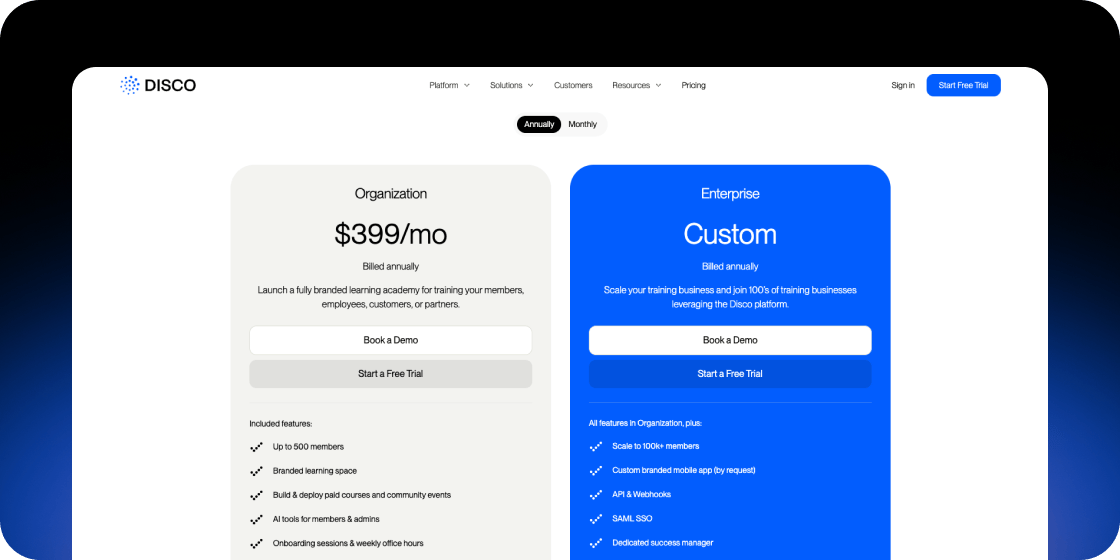
Disco offers two paid plans: **Organization** and **Enterprise**. Both are billed annually or monthly.
**Organization** is priced at \$399/month (billed annually) and includes:
* Up to 500 members
* Branded learning space
* Build and deploy paid courses and community events
* AI tools for members and admins
* Onboarding sessions and weekly office hours
* Discount for nonprofits
**Enterprise** is custom-priced and includes everything in Organization, plus:
* Scale to 100k+ members
* Custom branded mobile app (by request)
* API and Webhooks
* SAML SSO
* Dedicated success manager
* Personalized migration and onboarding
To discuss Enterprise pricing, click [**Book a Demo**](https://www.disco.co/book-a-demo) on the[ Disco pricing page](https://www.disco.co/pricing).
## Free Trial
Every new Disco Academy starts with a free 7-day trial. No commitment is required to start your trial. At the end of the trial period, you will need to select a paid plan and add a payment method to continue using your Academy.
## View Your Current Plan
1. In your Admin Area, navigate to **Settings** in the left sidebar.
2. Select **Billing**.
3. Your current plan appears under **Plan Details**.
## Update Your Plan
1. Go to **Admin Area** > **Settings** > **Billing**.
2. Under **Plan Details**, click **Update Plan**.
3. Follow the prompts to select your new plan and confirm the change.
If you are on an annual subscription, plan changes mid-cycle may involve a prorated charge. You will see the exact amount before confirming.
If you are approaching your member limit or need features like API access or SAML SSO, upgrading to Enterprise is the right move. Contact the Disco team to get a custom quote and migration support.
## Add a Payment Method
1. Go to **Admin Area** > **Settings** > **Billing**.
2. Under **Billing**, click **Add a payment method**.
3. Enter your card details and save.
## Cancel Your Plan
1. Go to **Admin Area** > **Settings** > **Billing**.
2. Under **Plan Details**, click **Cancel Plan**.
3. Follow the prompts to confirm cancellation.
If you need help with your cancellation or have questions about what happens to your Academy after you cancel, contact [support@disco.co](mailto:support@disco.co).
## FAQ
No, a credit card is not required to start the 7-day free trial. You only need to add a payment method when you are ready to subscribe to a paid plan.
Your trial expires after 7 days. To continue using your Academy, select a paid plan and add a payment method in **Admin Area** > **Settings** > **Billing**.
Yes. Disco supports both monthly and annual billing. Annual billing offers a lower effective monthly rate. You can review billing frequency options when you update your plan.
If you upgrade your plan before your current billing period ends, you will be charged a prorated amount for the remainder of the current period, plus the full subscription price starting from your next billing date.
Yes. The Organization plan includes a discount for nonprofits. Contact [support@disco.co](mailto:support@disco.co) to apply.
Contact [support@disco.co](mailto:support@disco.co) and the team will send your invoices directly. Receipts are sent to the billing email address on your account.
Disco handles refund requests on a case-by-case basis. Contact [support@disco.co](mailto:support@disco.co) as soon as possible after an unexpected charge and the team will review your request.
If **Update Plan** is not visible, your Academy may be on an annual plan that is not yet due for renewal. Plan changes on annual subscriptions are processed at renewal. Contact [support@disco.co](mailto:support@disco.co) to discuss your options.
## Overview
Disco is a subscription-based platform. Every new Academy starts with a free 7-day trial so you can explore the product before committing to a paid plan. After your trial, you choose a plan that fits your scale and requirements. Plans are billed annually, with monthly billing also available. You manage your plan and payment details from the **Billing** page in your Admin Area.
## Compare Plans
Disco offers two paid plans: **Organization** and **Enterprise**. Both are billed annually or monthly.
**Organization** is priced at \$399/month (billed annually) and includes:
* Up to 500 members
* Branded learning space
* Build and deploy paid courses and community events
* AI tools for members and admins
* Onboarding sessions and weekly office hours
* Discount for nonprofits
**Enterprise** is custom-priced and includes everything in Organization, plus:
* Scale to 100k+ members
* Custom branded mobile app (by request)
* API and Webhooks
* SAML SSO
* Dedicated success manager
* Personalized migration and onboarding
To discuss Enterprise pricing, click [**Book a Demo**](https://www.disco.co/book-a-demo) on the[ Disco pricing page](https://www.disco.co/pricing).
## Free Trial
Every new Disco Academy starts with a free 7-day trial. No commitment is required to start your trial. At the end of the trial period, you will need to select a paid plan and add a payment method to continue using your Academy.
## View Your Current Plan
1. In your Admin Area, navigate to **Settings** in the left sidebar.
2. Select **Billing**.
3. Your current plan appears under **Plan Details**.
## Update Your Plan
1. Go to **Admin Area** > **Settings** > **Billing**.
2. Under **Plan Details**, click **Update Plan**.
3. Follow the prompts to select your new plan and confirm the change.
If you are on an annual subscription, plan changes mid-cycle may involve a prorated charge. You will see the exact amount before confirming.
If you are approaching your member limit or need features like API access or SAML SSO, upgrading to Enterprise is the right move. Contact the Disco team to get a custom quote and migration support.
## Add a Payment Method
1. Go to **Admin Area** > **Settings** > **Billing**.
2. Under **Billing**, click **Add a payment method**.
3. Enter your card details and save.
## Cancel Your Plan
1. Go to **Admin Area** > **Settings** > **Billing**.
2. Under **Plan Details**, click **Cancel Plan**.
3. Follow the prompts to confirm cancellation.
If you need help with your cancellation or have questions about what happens to your Academy after you cancel, contact [support@disco.co](mailto:support@disco.co).
## FAQ
No, a credit card is not required to start the 7-day free trial. You only need to add a payment method when you are ready to subscribe to a paid plan.
Your trial expires after 7 days. To continue using your Academy, select a paid plan and add a payment method in **Admin Area** > **Settings** > **Billing**.
Yes. Disco supports both monthly and annual billing. Annual billing offers a lower effective monthly rate. You can review billing frequency options when you update your plan.
If you upgrade your plan before your current billing period ends, you will be charged a prorated amount for the remainder of the current period, plus the full subscription price starting from your next billing date.
Yes. The Organization plan includes a discount for nonprofits. Contact [support@disco.co](mailto:support@disco.co) to apply.
Contact [support@disco.co](mailto:support@disco.co) and the team will send your invoices directly. Receipts are sent to the billing email address on your account.
Disco handles refund requests on a case-by-case basis. Contact [support@disco.co](mailto:support@disco.co) as soon as possible after an unexpected charge and the team will review your request.
If **Update Plan** is not visible, your Academy may be on an annual plan that is not yet due for renewal. Plan changes on annual subscriptions are processed at renewal. Contact [support@disco.co](mailto:support@disco.co) to discuss your options.