> ## Documentation Index
> Fetch the complete documentation index at: https://docs.disco.co/llms.txt
> Use this file to discover all available pages before exploring further.
# Ask AI
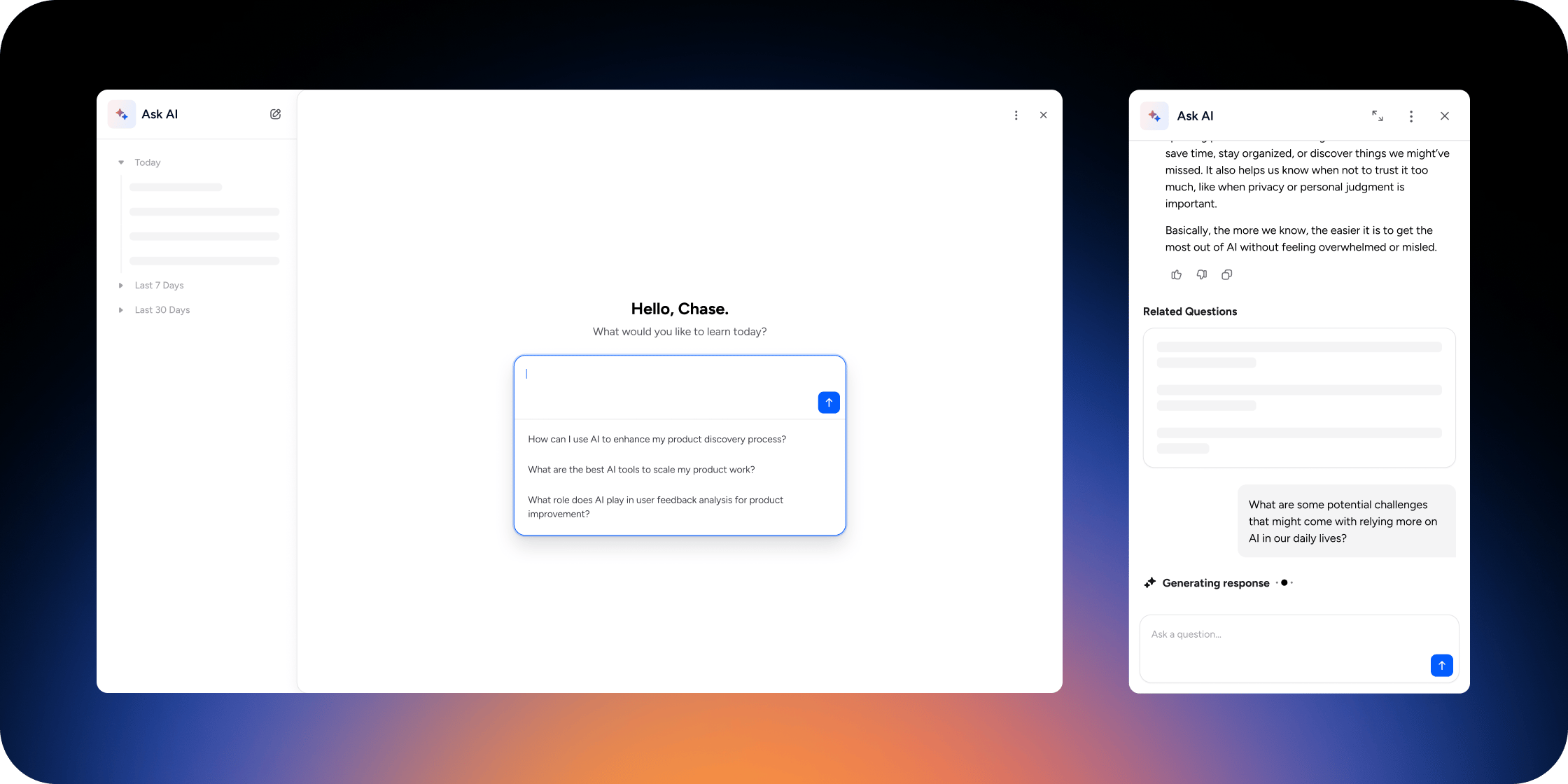
Ask AI is a built-in AI assistant that gives members instant, personalized answers drawn from your Academy's learning content and homepage.
 ## Overview
Ask AI helps members find answers without searching through programs, lessons, or documentation manually. Each member sees responses based only on the content they have access to, so private or unpublished content is never used in answers. Setup takes about five minutes and requires admin access.
## Set up Ask AI
Configure Ask AI before enabling it for members so you can preview behavior, choose sources, and add prompts that guide member questions.
1. Go to **Admin** → **Disco AI**.
2. Click **Edit** to open the Ask AI settings modal.
3. Open the **Details** tab and:
* Enter a `nickname` for Ask AI. This is the name members see.
* Choose whether to show **suggested prompts** globally, in content, or both.
* Add the prompts you want to surface to members.
4. Open the **Sources** tab and:
* Select the content sources Ask AI can use.
* Turn **Web Search** off if you want responses limited to your Academy content only.
5. Click **Preview** in the top right of the settings modal to test Ask AI before launch.
The **Preview** button only appears while Ask AI is turned off for members.
Always click through **Preview** with a handful of real member questions before enabling Ask AI. Previewing surfaces gaps in your sources, weak prompts, and unexpected answers while only admins can see them.
## Enable Ask AI for members
1. Go to **Admin** → **Disco AI**.
2. Turn on the toggle for **Ask AI**.
3. Click **Yes, Enable Ask AI**.
4. Choose whether to enable Ask AI on the **For You** page. This places an Ask AI input in the Hero block.
If you skip the For You setup, members can still reach Ask AI through the global drawer and inside lessons.
## How members ask questions
Members can open Ask AI in three places:
* **Global Ask AI drawer:** Click the Ask AI icon in the upper right corner.
* **Inside a lesson (text or video):** Click the Ask AI star icon to open a side panel.
* **For You page:** Use the Ask AI input in the Hero Banner, when enabled.
To ask a question:
1. Enter the question in the `Ask a question` box and press `Enter`.
2. Review the response, linked sources, and related questions.
3. Continue the conversation, or give feedback with thumbs up or thumbs down.
## Add Ask AI to the For You page
1. Add or edit the **Hero block** on the For You page.
2. In the Hero block settings, enable **Ask AI**.
3. Click **Save**.
Members now see an Ask AI input at the top of the For You page.
## View Ask AI engagement
1. Go to **Admin** → **Disco AI**.
2. Review:
* Number of members who used Ask AI
* Total questions asked
* Thumbs up and thumbs down feedback
* Engagement trends over time
Ask AI reporting shows aggregate usage and feedback. It does not show who asked each question.
## FAQ
No. Disco only uses the sources you provide to generate responses in your Academy. Your data is not sent to model providers like OpenAI for training purposes.
No. Ask AI only generates answers from content the member can access. Private or unpublished content is never used.
No. If a source is hidden from a member, Ask AI cannot use it for that member's answers. Every response is filtered by what the member already has permission to see.
Yes. Answers are generated instantly from your current content.
Yes. Asking a question in another language generally returns an answer in that language. Language coverage depends on the underlying model providers like OpenAI.
Yes. Ask AI is available on web, mobile web, and the Disco mobile app.
No. Answers are generated automatically. You can influence them by improving your content sources and refining your suggested prompts.
No. Ask AI is either on or off for the entire Academy.
No. Conversations are private to each member.
Yes. Go to **Admin** > **Insights** > **Ask AI**, then select **Export CSV**. The export respects the report's active filters and sort order and includes conversation-level metrics, but not Member identity or transcript text. Larger exports are processed in the background and sent by email when ready.
Ask AI is permission-aware. If the post or program lives in a restricted area the asking member cannot access, Ask AI will not surface it. Confirm the member has access to the program or member group where that content lives, and confirm the content is included as a source on the **Sources** tab.
Disco uses trusted foundation models like those from OpenAI, with custom system instructions and conservative model settings (such as temperature) to keep responses grounded in your sources. Disco continuously reviews AI output using human evaluators and automated review systems to identify patterns and improve accuracy over time.
## Overview
Ask AI helps members find answers without searching through programs, lessons, or documentation manually. Each member sees responses based only on the content they have access to, so private or unpublished content is never used in answers. Setup takes about five minutes and requires admin access.
## Set up Ask AI
Configure Ask AI before enabling it for members so you can preview behavior, choose sources, and add prompts that guide member questions.
1. Go to **Admin** → **Disco AI**.
2. Click **Edit** to open the Ask AI settings modal.
3. Open the **Details** tab and:
* Enter a `nickname` for Ask AI. This is the name members see.
* Choose whether to show **suggested prompts** globally, in content, or both.
* Add the prompts you want to surface to members.
4. Open the **Sources** tab and:
* Select the content sources Ask AI can use.
* Turn **Web Search** off if you want responses limited to your Academy content only.
5. Click **Preview** in the top right of the settings modal to test Ask AI before launch.
The **Preview** button only appears while Ask AI is turned off for members.
Always click through **Preview** with a handful of real member questions before enabling Ask AI. Previewing surfaces gaps in your sources, weak prompts, and unexpected answers while only admins can see them.
## Enable Ask AI for members
1. Go to **Admin** → **Disco AI**.
2. Turn on the toggle for **Ask AI**.
3. Click **Yes, Enable Ask AI**.
4. Choose whether to enable Ask AI on the **For You** page. This places an Ask AI input in the Hero block.
If you skip the For You setup, members can still reach Ask AI through the global drawer and inside lessons.
## How members ask questions
Members can open Ask AI in three places:
* **Global Ask AI drawer:** Click the Ask AI icon in the upper right corner.
* **Inside a lesson (text or video):** Click the Ask AI star icon to open a side panel.
* **For You page:** Use the Ask AI input in the Hero Banner, when enabled.
To ask a question:
1. Enter the question in the `Ask a question` box and press `Enter`.
2. Review the response, linked sources, and related questions.
3. Continue the conversation, or give feedback with thumbs up or thumbs down.
## Add Ask AI to the For You page
1. Add or edit the **Hero block** on the For You page.
2. In the Hero block settings, enable **Ask AI**.
3. Click **Save**.
Members now see an Ask AI input at the top of the For You page.
## View Ask AI engagement
1. Go to **Admin** → **Disco AI**.
2. Review:
* Number of members who used Ask AI
* Total questions asked
* Thumbs up and thumbs down feedback
* Engagement trends over time
Ask AI reporting shows aggregate usage and feedback. It does not show who asked each question.
## FAQ
No. Disco only uses the sources you provide to generate responses in your Academy. Your data is not sent to model providers like OpenAI for training purposes.
No. Ask AI only generates answers from content the member can access. Private or unpublished content is never used.
No. If a source is hidden from a member, Ask AI cannot use it for that member's answers. Every response is filtered by what the member already has permission to see.
Yes. Answers are generated instantly from your current content.
Yes. Asking a question in another language generally returns an answer in that language. Language coverage depends on the underlying model providers like OpenAI.
Yes. Ask AI is available on web, mobile web, and the Disco mobile app.
No. Answers are generated automatically. You can influence them by improving your content sources and refining your suggested prompts.
No. Ask AI is either on or off for the entire Academy.
No. Conversations are private to each member.
Yes. Go to **Admin** > **Insights** > **Ask AI**, then select **Export CSV**. The export respects the report's active filters and sort order and includes conversation-level metrics, but not Member identity or transcript text. Larger exports are processed in the background and sent by email when ready.
Ask AI is permission-aware. If the post or program lives in a restricted area the asking member cannot access, Ask AI will not surface it. Confirm the member has access to the program or member group where that content lives, and confirm the content is included as a source on the **Sources** tab.
Disco uses trusted foundation models like those from OpenAI, with custom system instructions and conservative model settings (such as temperature) to keep responses grounded in your sources. Disco continuously reviews AI output using human evaluators and automated review systems to identify patterns and improve accuracy over time.