> ## Documentation Index
> Fetch the complete documentation index at: https://docs.disco.co/llms.txt
> Use this file to discover all available pages before exploring further.
# AI Time Estimates
Automatically calculate accurate time-to-complete for every lesson and module. Learners can plan their week without surprises. Operators set realistic pacing expectations from day one.
 ## Overview
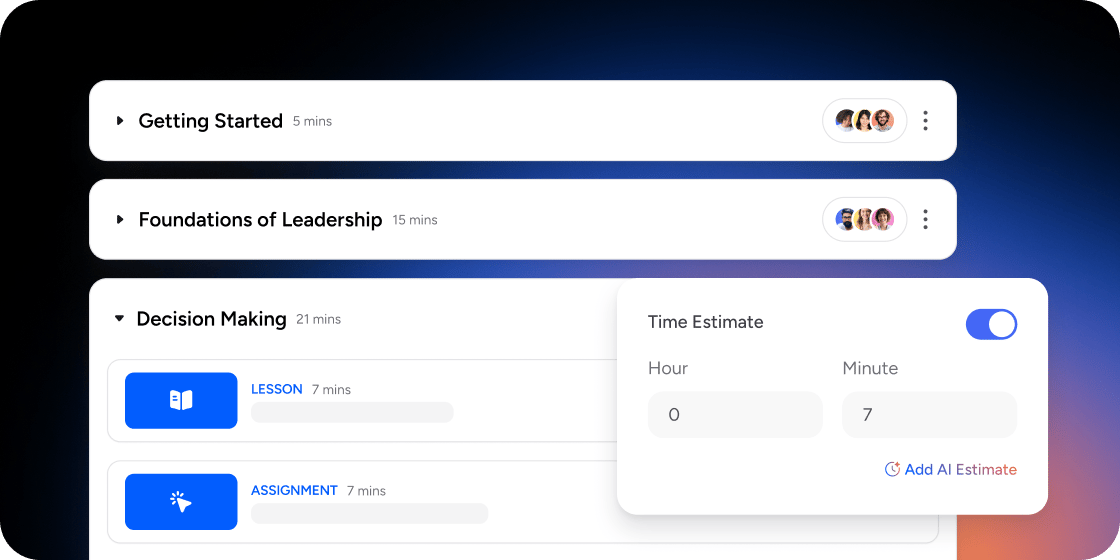
Time Estimates help you set clear expectations for members and pace your program. When the setting is enabled, Disco analyzes the content of a lesson or module (text length, attachments, and content type) and suggests a duration in hours and minutes. You can accept the AI suggestion, edit the value manually, or combine both. Estimates can be turned on at the lesson level, the module level, or across an entire curriculum.
## Enable Time Estimates on a Lesson
Use this option when you want a per-lesson estimate that members see on the lesson card.
1. Open the lesson and click into **Content Settings**.
2. Scroll to the bottom of the panel.
3. Toggle on **Time Estimate**.
4. Click **Get AI Estimate** to populate the `Hours` and `Minutes` fields.
5. Edit the values manually if you want to adjust the prediction.
## Enable Time Estimates on a Module
Use this option when you want a single combined estimate for a multi-lesson module.
1. Open the **Curriculum** app and select the module.
2. Click the **...** menu and choose **Settings**.
3. Toggle on **Time Estimates**.
4. Click **Get AI Estimate** to generate a duration based on every lesson in the module.
## How the AI Estimate Works
The AI reads your content and attachments and applies an average reading and viewing speed to produce a duration. It accounts for written content length, embedded videos, and attached files. It does not account for time members spend reflecting, taking notes, completing assignments outside the platform, or pausing to discuss in cohort programs.
Treat the AI estimate as a starting point, not a final answer. Most Disco Academies add a 5 to 10 minute buffer per lesson to cover note-taking, reflection, and short breaks. Generate the AI estimate first, then edit upward based on what you know about your members and the depth of engagement you expect.
## FAQ
The AI analyzes the content and attachments inside a lesson or module and applies an average reading and viewing speed to suggest a duration. Character length, video length, and attached files all factor in.
Yes. The `Hours` and `Minutes` fields are editable. Generate the estimate, then adjust manually if you want to add buffer time for reflection or activities.
Members see the estimate on the lesson or module they are about to start, helping them plan how much time to set aside.
No. If you change a lesson after generating an estimate, click **Get AI Estimate** again to refresh the number.
Disco does not currently report per-lesson time spent or an average across members. Time-spent data is available at the program level under **Admin** → **Insights** → **Members**, but it does not break down to the lesson. For now, the AI estimate plus a manual buffer is the recommended approach.
A combined course-level total is not surfaced on the Explore overview today. Members see lesson and module estimates once they are inside the curriculum. Surfacing total duration on Explore is a logged feature request.
The AI uses the content of the item and any attachments. Interactive elements like quizzes and surveys are estimated based on length and question count, but you should adjust manually if your members typically take longer to reflect on responses.
## Overview
Time Estimates help you set clear expectations for members and pace your program. When the setting is enabled, Disco analyzes the content of a lesson or module (text length, attachments, and content type) and suggests a duration in hours and minutes. You can accept the AI suggestion, edit the value manually, or combine both. Estimates can be turned on at the lesson level, the module level, or across an entire curriculum.
## Enable Time Estimates on a Lesson
Use this option when you want a per-lesson estimate that members see on the lesson card.
1. Open the lesson and click into **Content Settings**.
2. Scroll to the bottom of the panel.
3. Toggle on **Time Estimate**.
4. Click **Get AI Estimate** to populate the `Hours` and `Minutes` fields.
5. Edit the values manually if you want to adjust the prediction.
## Enable Time Estimates on a Module
Use this option when you want a single combined estimate for a multi-lesson module.
1. Open the **Curriculum** app and select the module.
2. Click the **...** menu and choose **Settings**.
3. Toggle on **Time Estimates**.
4. Click **Get AI Estimate** to generate a duration based on every lesson in the module.
## How the AI Estimate Works
The AI reads your content and attachments and applies an average reading and viewing speed to produce a duration. It accounts for written content length, embedded videos, and attached files. It does not account for time members spend reflecting, taking notes, completing assignments outside the platform, or pausing to discuss in cohort programs.
Treat the AI estimate as a starting point, not a final answer. Most Disco Academies add a 5 to 10 minute buffer per lesson to cover note-taking, reflection, and short breaks. Generate the AI estimate first, then edit upward based on what you know about your members and the depth of engagement you expect.
## FAQ
The AI analyzes the content and attachments inside a lesson or module and applies an average reading and viewing speed to suggest a duration. Character length, video length, and attached files all factor in.
Yes. The `Hours` and `Minutes` fields are editable. Generate the estimate, then adjust manually if you want to add buffer time for reflection or activities.
Members see the estimate on the lesson or module they are about to start, helping them plan how much time to set aside.
No. If you change a lesson after generating an estimate, click **Get AI Estimate** again to refresh the number.
Disco does not currently report per-lesson time spent or an average across members. Time-spent data is available at the program level under **Admin** → **Insights** → **Members**, but it does not break down to the lesson. For now, the AI estimate plus a manual buffer is the recommended approach.
A combined course-level total is not surfaced on the Explore overview today. Members see lesson and module estimates once they are inside the curriculum. Surfacing total duration on Explore is a logged feature request.
The AI uses the content of the item and any attachments. Interactive elements like quizzes and surveys are estimated based on length and question count, but you should adjust manually if your members typically take longer to reflect on responses.